|
|
Location: Home / Peripherals / Scanners / Plustek 7200i
Plustek 7200i
Film Scanner (Barcode EAN = 4042485362972).
from £168.23
|
|
|
|
|
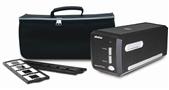
| Plustek OpticFilm 7200i is the perfect scanner for photographers and small office/workshop users, offering a variety of possibilities including high quality images for magazines and other printed material, photo enlargements, brochures, digitizing slides/negatives, web pages, as well as images to share with friends on the Internet, and more!The Plustek OpticFilm 7200i is a 7200 dpi film scanner capable of scanning 35 mm slide and negatives. High optical resolution, USB 2.0 connection and fast s |
Where to Buy Online Click on the shop name to visit their website and buy this product
(cheapest price in red). (note: Please make sure you double check the product details on the shop's site BEFORE you order the
Plustek 7200i and also read our Accuracy of Product Information statement below.
)
|
|
Average Rating:
Link to This Page
There are 3 reviews for this product.
Compact and robust and straightforward to use. These are the plus points. When I installed on my Windows XP SP2 laptop all went well, until the point where it said `restart your computer`. I couldnt - the whole system had frozen! Clicking the Start button (to power-off / restart) had no effect; CTRL+ALT+DEL had no effect; trying to switch off the laptop had no effect - the system had completely hung. Unplugged at the mains and the computer went into battery mode. Unlucky one-off, or a common problem with this software? Took a break and system worked fine (with scanner installed) on restart. Based on previous reviews did not install SilverFast software. After a couple of passes of some old (1990s) transparencies using just the scanner software and with so-so results, decided to do what others had done and downloaded VueScan. What a difference! Now a happy customer. But beware the gremlins.
Reviewed by: Amazon Reviewer Rating: Date Reviewed: 21Mar2008 | | | Well...... where do I start?
We discover over 1200 family slides, dating back to as early as 1972 and decided that we really should try to digitise them before any further image depreciation occured.
The slides were in good condition and the Plustek 7200i made sure that these were easily transfered to a digital format. I bought the 7200i after reading previous reviews for it and thought that for £159.99, it was reasonably priced to do the job at hand - It really was.
I had read that some people had had issues installing the software for the scanner, but I had no such difficulties. I attached the Plustek 7200i to the PC and turned it on. My Windows XP machine automatically recognised it as a scanner and I entered the CD to install the correct drivers for it.
The drivers installed promtly, and the Imaging software on the same CD also installed, though with a little lag (I started to worry!). It was fine, it all completed and the last thing to do was install the Photographic Software which again on reading reviews, I opted not too.
I downloaded a trial version of VueScan which was fantastic as a demo copy. It automatically recognised that I had a scanner installed and switched on and gave basic options for use, which at this stage were enough to get started.
I scanned 20 slides as a prctice before cracking on with the whole job. The only thing with VueScan is that if you do not purchase it, it puts dollar signs ($$$$$$$) sparadically over the output image, which wasnt an issue as the output pics were still of startling clarity, and the eye natuarally focussed on the image as opposed to the dollars.
I was that impressed that I bought a full version of VueScan ($39.95) and used that to process all of the slides (without dollar signs)
Processing the slidesis simple........ Load the slide tray with 4 slides (or an additional tray come with the 7200i for negatives) insert into the scanner and press SCAN on the VueScan software, though there is a button on the macine if you use the software that comes with it.
This will scan and output the photo to your desiganted file location.
And thats it.............. simple!!
------------------------------------------------------------------------ I MUST RECOMMEND THE VUESCAN SOFTWARE FOR USE WITH THIS SCANNER!!!!!!!!! ------------------------------------------------------------------------
Reviewed by: Amazon Reviewer Rating: Date Reviewed: 21Feb2008 | | | Im in the process of archiving family photos taken by my/my wifes parents. As background/context - Im very experienced at using PCs and all sorts of software. Im no photo specialist but quite handy with Photoshop when I need to be.
This scanner (at this price range £150ish) appeared to be the only sensible option for volume scanning. From my experience of the first 100 slides, the Infra-red scratch/dust removal is essential when choosing a scanner. I almost bought the new model 7300 Plustek scanner before realising that it didnt have this option so I kept with this older version.
Experience:
Im finding it easier to use Vuescan software I purchased separately to the scanner (try the demo found online). Im sure the included software is perhaps better if I invest more time in configuring it but Im doing many hundreds of slides and Vuescan just works with little configuring for bulk work. Im expecting to use `Adobe Photo Elements` software to do additional processing on favourite slides.
The scanner works well. Its handier to use than a flatbed scanner for slides. The scratch and dust removal tackles even the most terrible slides and makes a significant improvement. Its fairly quick to scan each slide, doing 2 passes (normal then infrared). The Vuescan software will allow multiple scans to mimick the new multiscan feature of the 7300 model but I find little improvement for the additional time it takes. Perhaps Id use it again on special slides I wanted to treasure more?
Id highly recommend this scanner for your average task of working through family slides and getting them accessible again at a practical cost. Im sure spending more would produce even better results but there again the scanner is only one part of the equation (software and post processing being more important to a good final result).
Reviewed by: Amazon Reviewer Rating: Date Reviewed: 02Jan2008 | | |
|
|
|
Accuracy of Product Information
All product features, images, prices and other information published on our website have either been made accessible by suppliers or been gathered from public-domain sources. Advanced System Technologies Ltd. makes every effort to ensure all information on this website is as accurate and up to date as possible. However, Advanced System Technologies Ltd. cannot guarantee the reliability or the accuracy of the information contained within its pages. All the actions taken by the user of the website are the responsibility of the individual.
Copyright © 1999,2013 Advanced System Technologies Limited. All Rights
Reserved.
All information on this site is presented as a guide. Advanced System Technologies Ltd. accepts no responsibilty for the accuracy of any information contained on the pages within this site.
|
The CompareStorePrices.co.uk device is a registered trademark of Advanced System Technologies Limited. All other trademarks and devices are the property of their respective owners.
|